
How-to: Create an Accession Record in ArchivesSpace
Quick, practical checklist and example to use at intake
1. Before You Start (Prep)
Have these ready before you open ArchivesSpace—it makes intake fast and auditable.
- Complete the review of the ArchivesSpace Workflow Guide
- Gather intake materials: deed/transfer paperwork, donor contact, box/folder counts, media list, condition notes. Upload all materials to the HARC SharePoint
- Decide accession number pattern (example:
HARC_011_0000). Note the next available number - Stage and label physical items with a temporary tag that includes the accession ID
2. Create the Accession Record — Step by Step
- Log in → Create Accessions (or Add Accession)
- Fill the core fields (see next section). Save early—you can add richer metadata after creating the record
- Upload donor agreement and inventories to the HARC SharePoint
- Once the accession record is created, click Spawn → Resource. This will create your Collection Resource Record automatically
.png)
3. Field-by-Field Guidance
Click each section below to expand detailed instructions for each group of fields.
Accession Identifier & Title
Short descriptive title—e.g., Congregation of the Sisters of Oklahoma, 1970–1995
Your canonical ID (e.g., HARC_011_0000). Keep the pattern consistent
Enter the accession date if different than today’s date (YYYY-MM-DD format)
Do NOT check. Accession records are internal administrative records
Brief overview of what the accession contains, including genre/format information and information about activities, functions, or events related to the creator
Brief overview of the physical and/or digital condition, noting any conservation or preservation issues
Record if any materials were removed from this accession into another collection
Record whether or not there is an inventory for this accession
Record if the collection is new or an accrual/addition; also record the donor’s name and contact information
Record who accessioned the material and any additional notes. If unknown, record: “Accessioned by Walter P. Reuther Library Staff.”
Select one: Deposit, Gift, Purchase, Renumber, Transfer
Select one: Collection, Papers, Publications, Records
Check if there are ANY restrictions on the collection
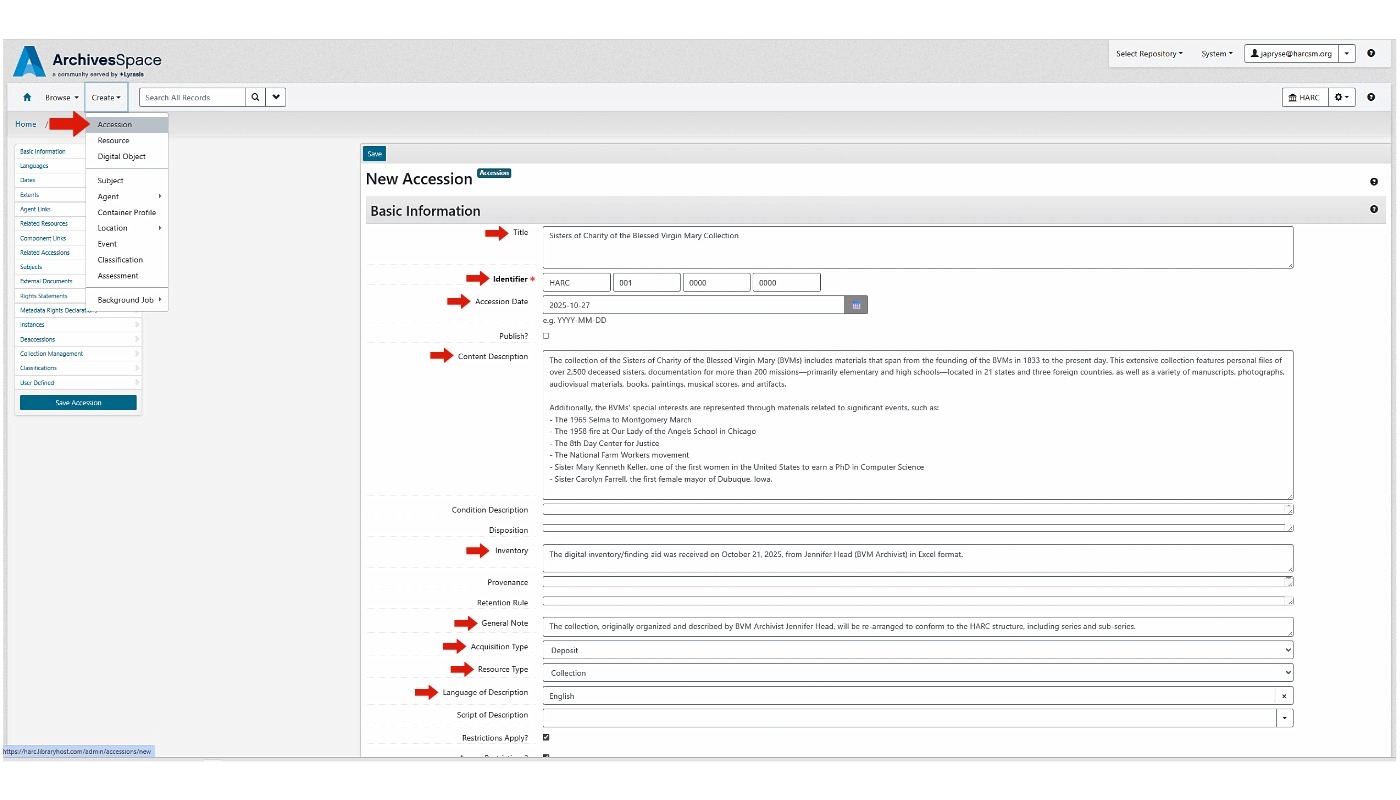
Click image to view search example in ArchivesSpace
Notes, Rights & Restrictions, External Documents
Condition, sensitive content (FERPA, SSNs), immediate actions needed (conservation, rehousing)
Add rights statements or embargo dates. Attach signed deeds and label attachments clearly
Toggle if there are access restrictions and summarize the reason
Add a note about what documents are available and include the link
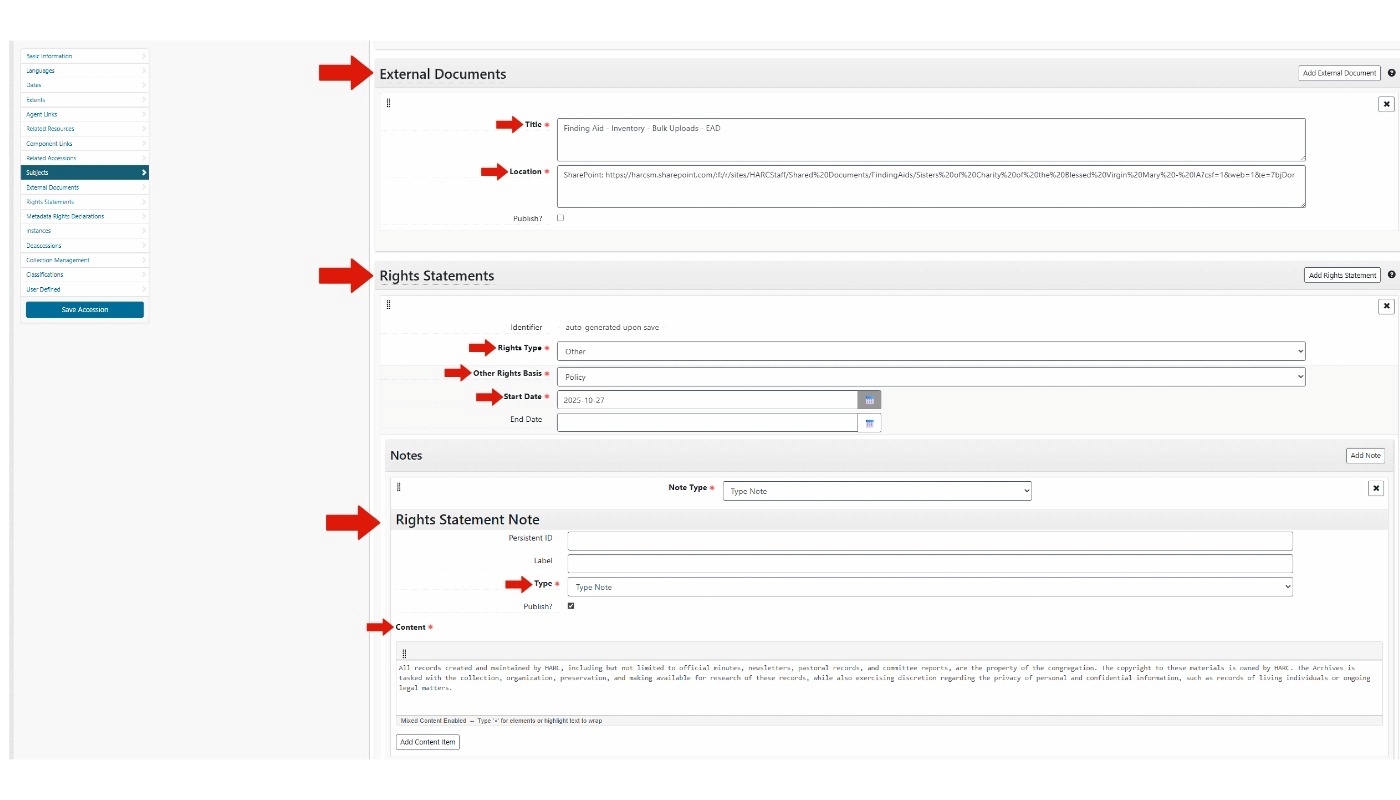
External Documents section in ArchivesSpace
4. Save & Attachments
- Save the accession record after adding core metadata; attach scanned donor agreement(s) and inventory PDFs
- If files are large, attach a manifest PDF and add an external storage URL in a note
- Label attachments clearly: e.g.,
HARC_001_0000 Finding Aid - Inventory - Bulk Uploads - EAD - Save this PDF in the Collection folder on SharePoint
.png)
5. Post-Creation Actions
- Physically label boxes/folders with accession ID and place a paper copy of the accession record in Box 1
- Create top containers and link them to the accession; when processed, create a Resource record and transfer containers as needed
- Retain accession paperwork for any future deaccession or rights questions
6. Best Practices & Tips
- Be conservative with access. Flag and restrict materials with FERPA/medical/SSNs
- Use consistent extent units: linear feet for manuscript boxes, items for small donations, MB/GB for digital
- Attach signed agreements ASAP—they are your legal record of transfer
- Document any changes done during intake (rehousing, removal of non-archival items)
- Link donors to Agent records to avoid duplicate person entries. See Agent and Subject Guide
7. Quick Accession Checklist
8. Example Accession Record
Sample values for a typical HARC accession. Adapt to your collection.
Accession Identifier: HARC_001_0000_0000
Title: Accession: Sister Agnes Collection, 1950–2005
Accession Date: 2026-01-06
Extent: 6 linear feet; 3 oversize folders; 2.4 GB (born-digital)
Donor: Sisters of St. Agnes (Corporate Body) — contact: Sr. Mary Smith, sr.mary@cong.org
Physical Location: Staging Room — Shelf B (Box tags printed)
Accessioning Note: Received 6 boxes; Box 3 stained; contains student records
    for 1980–1985 (FERPA) — restricted. Oversize maps in Folder OS1.
Rights: Donor retains copyright. Some materials restricted until 2030.
Attachments: HARC-2026-001_deed_signed.pdf
Accessioned by: JA Pryse
Continue the Workflow
Proceed to the Resource Records guide for Step 2, or return to the complete ArchivesSpace Workflow Guide.